

Benchmarking: How much usage should we be expecting and what are the average AI resolution rates?
In the realm of higher education, leveraging AI support systems like LearnWise offers a transformative approach to handling student and faculty queries. Establishing benchmarks for usage and resolution rates is crucial for maximizing the effectiveness of these AI tools. Institutions should ideally target a 50-80% AI resolution rate, which may vary based on content quality and bot training. This ar
2 min readUpdated
On this page
Determining Your Institution's AI Resolution Rate #
To assess your AI's performance, follow these steps:
- Access LearnWise Analytics: Log into your LearnWise admin account at www.learnwise.ai.
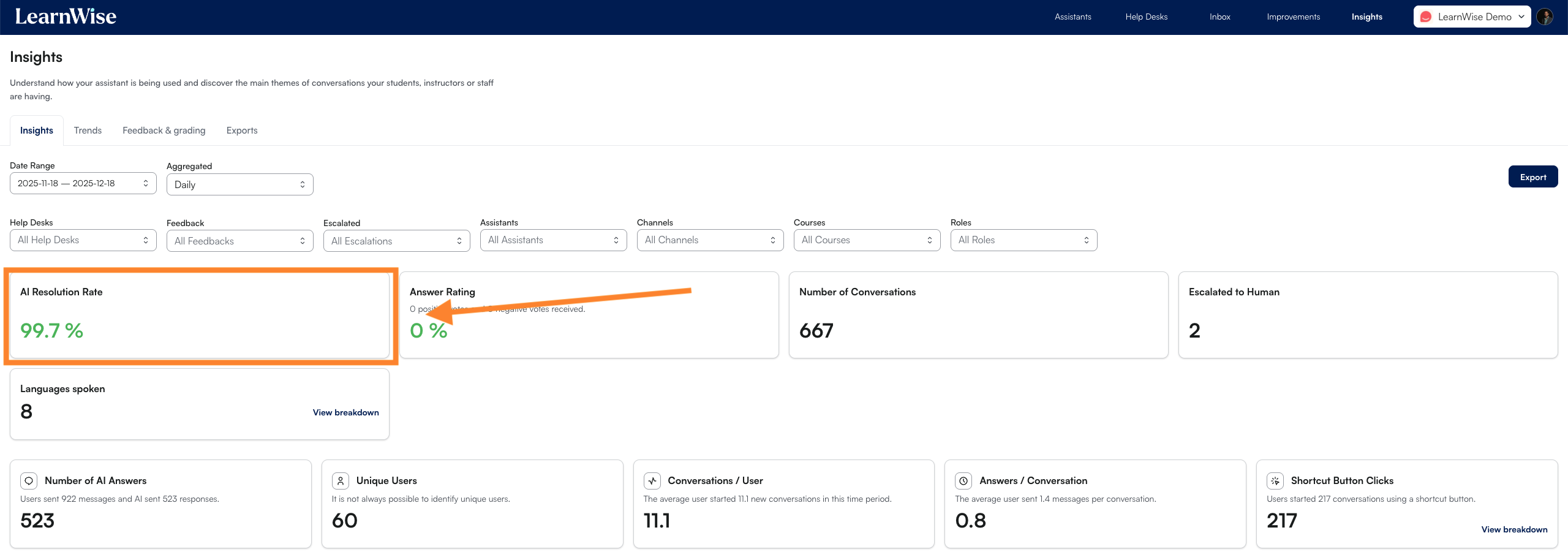
- Navigate to Insights: On the main dashboard, locate the Insights tab in the top navigation.
- Review Resolution Metrics: Look for statistics or graphs indicating the number of queries resolved by the AI versus those escalated called ‘AI Resolution Rate’.
Factors Influencing Resolution Rate #
- Content Quality: The accuracy and comprehensiveness of the information fed into the AI.
- Bot Training: How well the AI is trained to interpret and respond to various queries.
- User Query Complexity: The nature of questions asked by students and faculty.
Enhancing Your AI Resolution Rate #
To improve the AI resolution rate, consider the following strategies:
- Expand Content-Base: Continuously add relevant content to the AI’s knowledge base. This includes updating FAQs, integrating new educational tools, and adding institutional-specific information.
- Utilize Knowledge Gap Insights: Regularly review the Knowledge Gap Insights report provided by LearnWise. This tool identifies areas where your current content might be lacking, or where new content could be beneficial. It helps in tailoring your AI’s learning to current user needs.
- Collaborate with LearnWise Team: Work closely with LearnWise experts to refine your AI’s responses and knowledge base. Their EdTech experience can provide valuable insights into optimizing your AI tool.
- Monitor Regularly: Keep an eye on resolution rates and user feedback to understand the AI’s performance over time. This ongoing assessment allows for timely adjustments.
Long-Term Improvement #
Remember, achieving an optimal resolution rate is a progressive journey. It requires close to 1,000 conversations to reach a reliable percentage, and continuous improvement is key. Regularly updating the AI with new information, learning from user interactions, and leveraging expert support will gradually enhance its effectiveness.
Still stuck?
Ask the LearnWise assistant. It answers from these guides.
Related guides
- What is the “AI Resolution Rate”?Insights & Reports
- How can I view and understand assistant usage insights?Insights & Reports
- What insights are available to instructors?Insights & Reports
- How do I create and export a report of Inbox conversations?Insights & Reports
- How to create a new trends report?Insights & Reports