

How do I set data retention periods for my organization?
Choose how long LearnWise keeps conversations, messages, improvements and audit records before they are deleted automatically.
2 min readUpdated
On this page
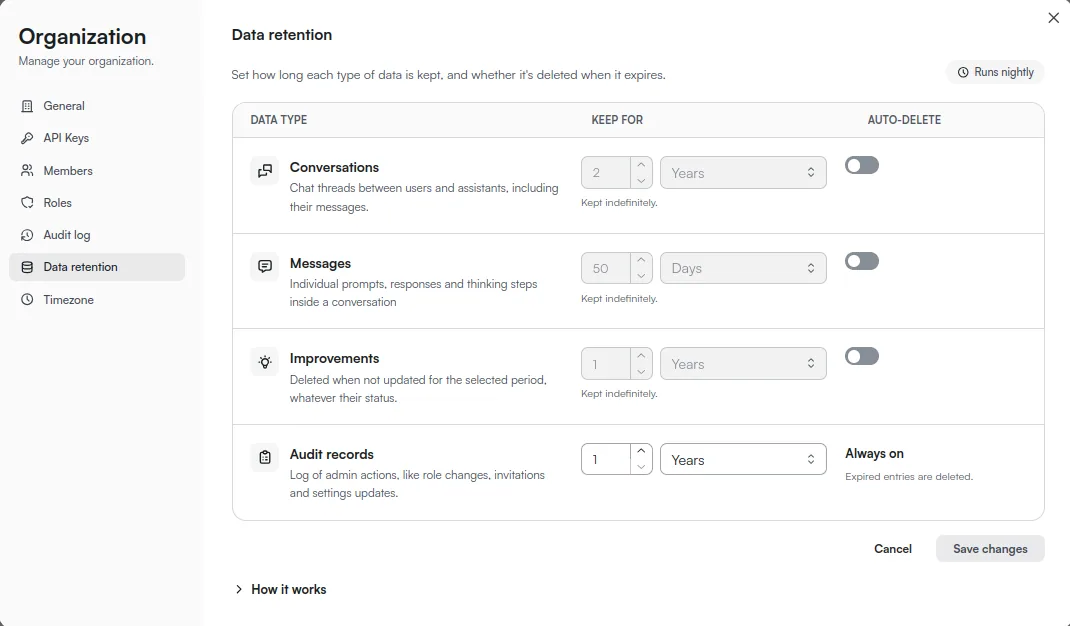
Set how long each type of data is kept, and whether it is deleted when it expires. A nightly check deletes data that is older than its period, for each data type with auto-delete turned on.
Who Can Set Data Retention Periods? #
Only roles with the data retention capability can change retention periods. By default, this is Super Admins only.
To give this capability to another role, see How do I create a custom role?
Which Data Can Be Deleted Automatically? #
|
Data type |
What it covers |
|---|---|
|
Conversations |
Chat threads between users and assistants, including their messages. |
|
Messages |
Individual prompts, responses and thinking steps inside a conversation. |
|
Improvements |
Improvements that have not been updated for the selected period, whatever their status. |
|
Audit records |
The log of admin actions, such as role changes, invitations and settings updates. |
Conversations, messages and improvements are kept indefinitely until you turn on Auto-delete for them. Audit records are always deleted when they expire. Their Auto-delete is Always on, but you can change how long they are kept.
How Do I Set a Retention Period? #
- Open your organization settings.
Open the organization switcher and select Manage. - Go to Data retention.
Select the Data retention tab. - Turn on auto-delete.
For each data type you want deleted automatically, turn on Auto-delete. - Choose a period.
Under Keep for, enter a number and choose a unit, such as Days or Years. The minimum is 30 days. - Save your changes.
Click Save changes. To discard your changes instead, click Cancel.
Note: To change how long audit records are kept, skip step 3. Their auto-delete is always on.
Things to Keep in Mind #
- Deletion runs nightly: Data past its retention period is deleted during the next nightly check, not straight away.
- The period counts from the last message: A conversation's retention period starts from its last message, not from when it started. For example, with a 30-day period, a conversation started 3 months ago whose last message was sent 10 days ago is kept until 30 days after that last message.
- Deleting messages keeps the conversation: When messages are deleted, old messages are removed from conversations that are kept, and the transcript shows that earlier messages were deleted. Linked improvements stay, without those messages.
- The minimum period is 30 days: You can't set a shorter period for any data type.
- Deleted data can be restored: Retention uses a soft delete, so deleted data can still be restored if needed.
- Turning auto-delete off keeps data indefinitely: Conversations, messages and improvements are kept until you turn auto-delete on again. Turning it off only stops future deletions. It does not restore anything already deleted.
Still stuck?
Ask the LearnWise assistant. It answers from these guides.