

What are Trend Insights?
Turn Support Conversations into Actionable Insights for Student and Faculty Success
2 min readUpdated
On this page
Understanding Top Trends and Themes Insights in LearnWise #
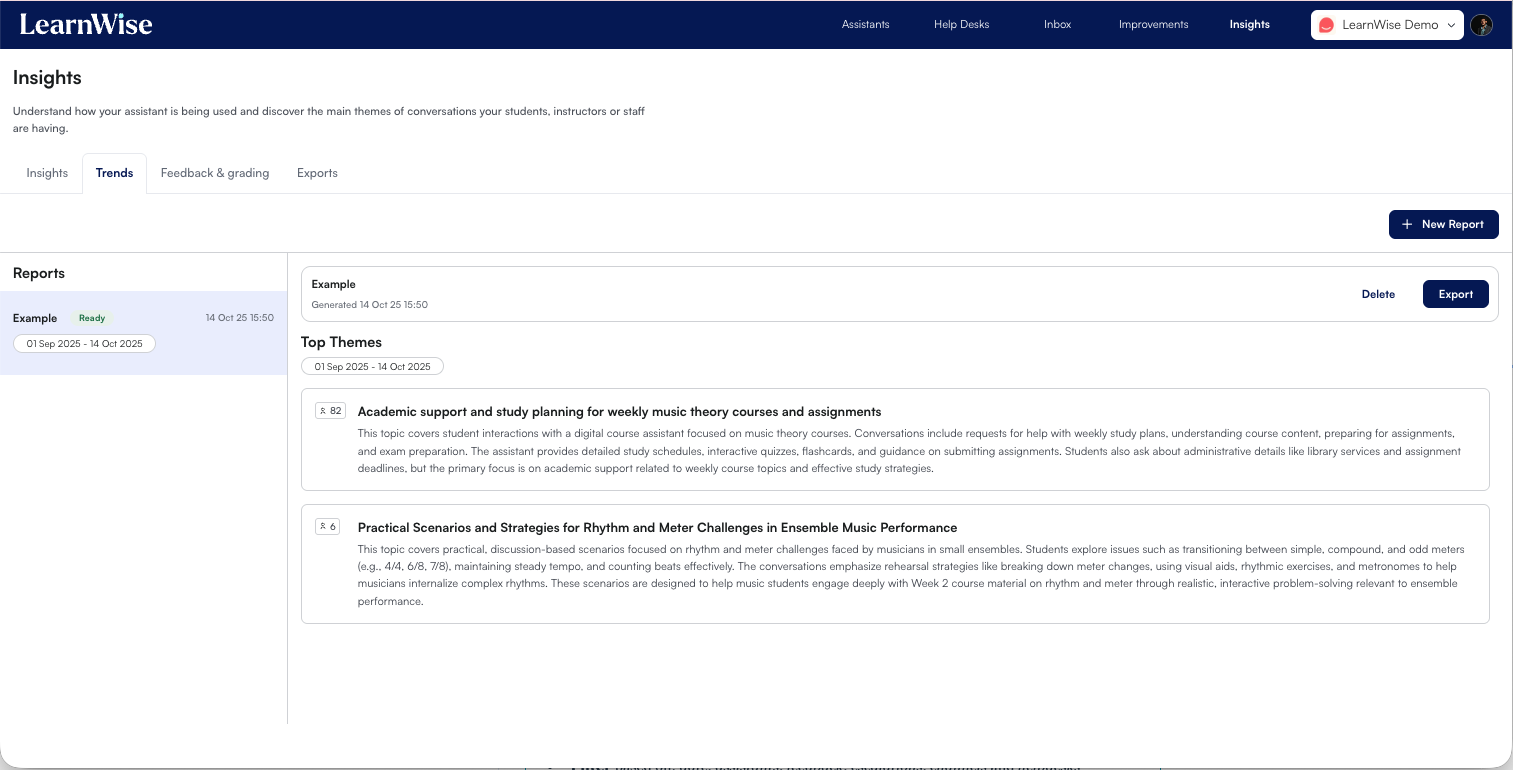
Support Trend Insights in LearnWise are designed to harness the wealth of qualitative data from support interactions. This data provides a macro view of recurring support trends, themes, and primary case drivers. By systematically analyzing types and frequencies of queries, LearnWise's AI and human support collaboration enables educational institutions to gain a deeper understanding of student and faculty needs, facilitating more informed and effective responses.
Why Support Trend Insights Matter #
Support Trend Insights matter because they allow institutions to:
- Identify Patterns: Discover common issues such as course selection concerns or login challenges, offering a clear picture of the support landscape.
- Strategize Collaboratively: Share these insights with department heads and staff to enhance student and faculty support resources.
- Monitor and Improve Outcomes: Use these reports to track the impact of changes and verify that implemented solutions effectively address the identified trends.
Overview of the Support Trends Report in LearnWise #
The Support Trends Report in LearnWise is an advanced tool that transforms qualitative interaction data into actionable insights:
- Top Trends Analysis: Highlights the most reported issues, with an AI-generated title and natural language summary to quickly grasp the essence of each trend.
- Conversation Volume: Displays the number of associated conversations for each trend, providing insight into the issue's impact and reach.
How to Read and Use the Support Trends Report #
- Trend Details: Click on a trend to view detailed conversations, and understand the specific concerns and context behind each issue.
- Historical Context: Access and evaluate multiple reports to track progress and inform future strategies.
- Actionable Insights: Use the data to prioritize responses, update knowledge bases, and implement training to address the most pressing trends.
- Time Range Evaluation: Review these insights per semester or month to immediately align support services with current needs, and anticipate future challenges.
By effectively reading and taking action on the Support Trends Report, higher education institutions can enhance their AI support systems, ensuring that they are responsive, efficient, and continually improving to meet their community’s dynamic needs.
Still stuck?
Ask the LearnWise assistant. It answers from these guides.
Related guides
- How to create a new trends report?Insights & Reports
- How to delete a Trends report?Insights & Reports
- What insights are available to instructors?Insights & Reports
- Benchmarking: How much usage should we be expecting and what are the average AI resolution rates?Insights & Reports
- How can I view and understand assistant usage insights?Insights & Reports