

Can I be selective around which website content I add to LearnWise?
In LearnWise, you have the flexibility not just to add entire websites as knowledge sources, but also to selectively include specific portions or subdomains of a site. This tailored approach ensures that your AI assistant accesses only the most relevant and necessary content.
2 min readUpdated
On this page
How it works: #
1. Subdomain Segmentation: When your institution's website is segmented into various subdomains catering to different departments or services, you will need to add each subdomain as a unique entry to include the content.For example:
faculty.youruniversity.edufor faculty-related queries.students.youruniversity.edufor student-focused information.-
research.youruniversity.edufor research department resources.By treating each subdomain as a separate entity, the assistant can provide more targeted responses based on the distinct content of each section.
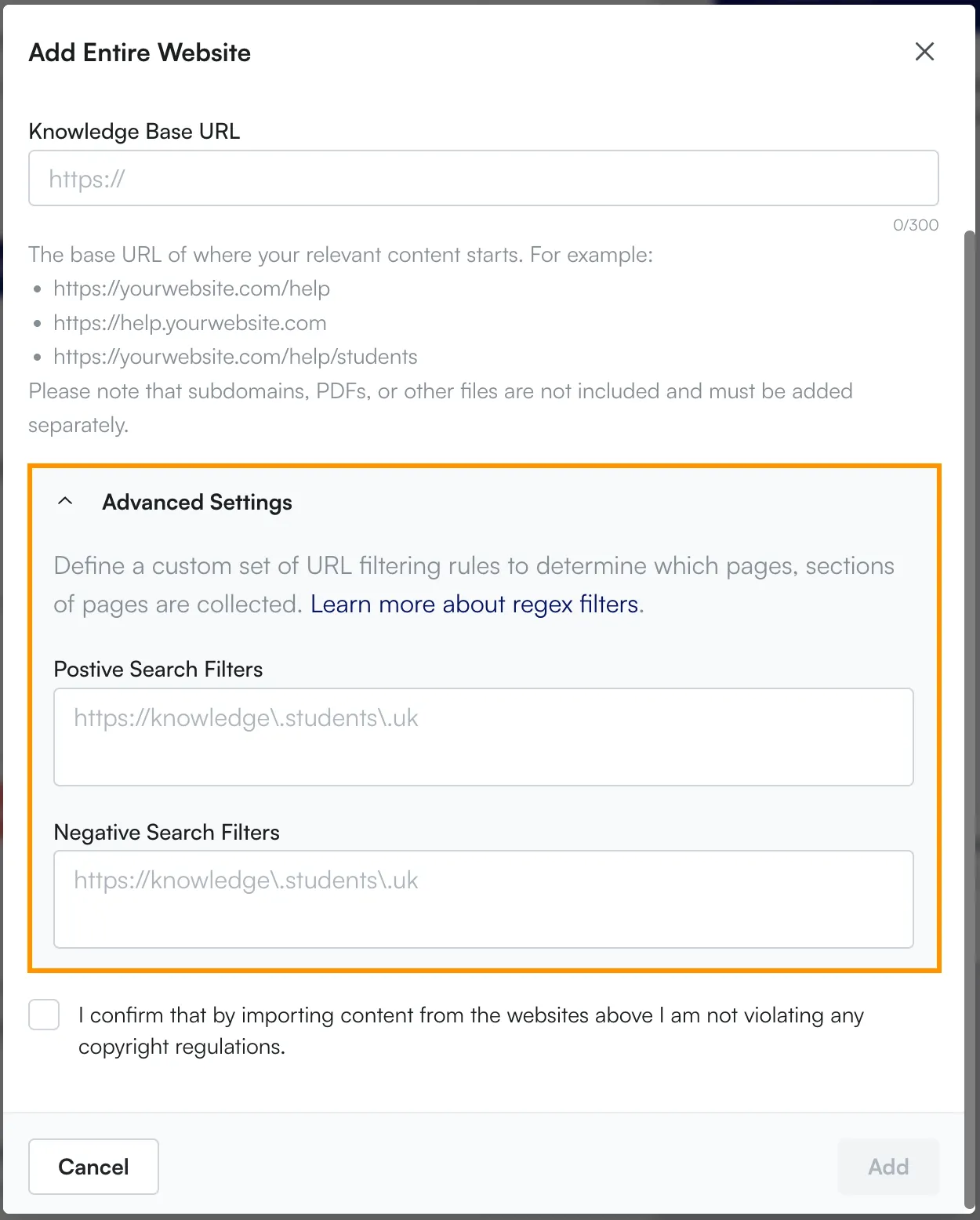
2. Custom URL Filtering Using Regex: To further refine the content, employ regular expressions (regex) to define inclusion rules for specific URLs or types of content. This level of customization is especially useful when you want to:
- Exclude certain pages or sections that may not be relevant to the assistant’s purpose.
- Focus on specific themes or topics within a larger website, ensuring the AI is trained on content that is most pertinent to the users' needs.
To make these customizations yourself, click ‘Add Entire Website,’ once you have added a name and Knowledge Base URL, navigate to ‘Advanced Settings’’ and enter your positive and/or negative search filters
If you would like assistance on using custom URL filtering, please contact the LearnWise support team at help@learnwise.ai for direct support.
When do I need to be selective around my website content? #
- Role-Specific Information: Different user groups such as students, faculty, and administrative staff may require access to different types of information. By adding only the relevant sections of your website, you can ensure that each group gets the most pertinent and useful content.
- Departmental Customization: In large institutions with multiple departments, each with its own subdomain or section on the website, you can tailor the assistant to provide support specific to the department’s needs, making the assistant more effective and relevant.
- Filtering EdTech Content: If your institution uses only certain tools or features from an EdTech vendor, it is practical to include only the relevant sections of the vendor's support documentation. This avoids confusion and streamlines the support process.
- Focus on Current Initiatives: If there's a particular initiative or program that's currently a focus at your institution, you might want to train the assistant specifically on that content to provide concentrated support.
By carefully selecting which parts of a website to add as a knowledge source, you can significantly enhance the effectiveness and relevance of LearnWise assistants for highly specific use-cases, ensuring it meets the specific needs of different users within your institution.
Still stuck?
Ask the LearnWise assistant. It answers from these guides.
Related guides
- How can I use regex and URL filters to control web scraping in LearnWise?Build your assistant
- How to add a website as a knowledge source?Build your assistant
- How are the multiple different knowledge sources prioritized?Build your assistant
- How can I add an FAQ to my knowledge?Build your assistant
- How do I add knowledge content that is hosted on external platforms?Build your assistant