

How can I ask the AI assistant a question?
Start chatting with your AI assistant and get instant cited answers
2 min readUpdated
On this page
The LearnWise AI Assistant is a robust tool designed to address a variety of academic and support-related inquiries efficiently. With capabilities to understand and respond based on a vast repository of knowledge, the assistant ensures users can access relevant information in a streamlined, user-friendly way.
Step-by-Step Guide to Asking the AI Assistant a Question #
- Open the AI Assistant: Begin by activating the assistant. Locate the AI assistant icon or widget, usually found at the bottom of the screen.
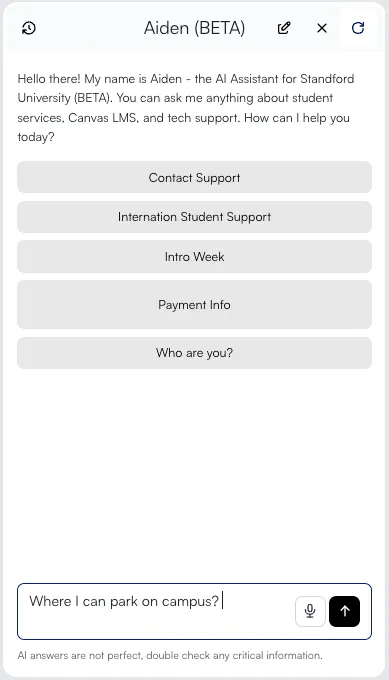
- Initiate a Conversation: After clicking the assistant icon, a chat window will appear with a text box at the bottom. This is where you will type your question.
- Type Your Question: Enter your question in the text box. The more specific you are, the better the assistant can tailor its response to meet your needs. Whether you need help with course materials, technical support, or general guidance, the assistant is designed to understand a wide range of topics.
-
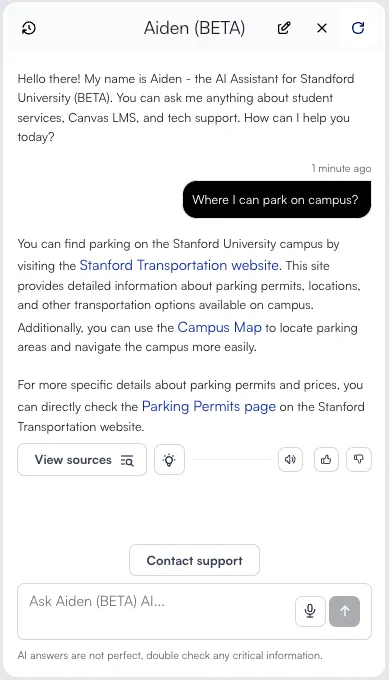
Submit Your Question: Press 'Enter' or click the 'Send' button to submit your question. The assistant will acknowledge receipt of your question by repeating it back to you, or reiterate it in different ways to ensure it accurately understands your request before proceeding.
-
Receive a Comprehensive Answer with Cited Sources: The assistant will search through its knowledge sources, including institutional knowledge bases, FAQs, and relevant documents to provide the most accurate, comprehensive response. At the end of each answer, you’ll find citations referencing the specific resources used, assuring you of the reliability and transparency of the information provided.
Response Time Expectations #
What to Expect:
LearnWise AI assistants typically respond within 1-3 seconds for most queries. Response times may vary based on:
- Question complexity - Simple factual questions respond faster than complex, multi-part queries
- Knowledge base size - Larger knowledge bases may require slightly longer search times
- API integrations - When fetching real-time data from external systems (LMS, student information systems, etc.), responses may take 3-5 seconds
- Current system load - Peak usage periods may result in minor delays
If you experience delays: Occasional longer response times can occur during system updates or high traffic periods. If persistent delays occur, please contact your administrator or LearnWise support.
Additional Tips for Engaging with the LearnWise Assistant #
- Prioritize Clarity: Be as specific as possible to receive a tailored response.
- Verification: Use the citations provided to check the information source for further details if needed.
- Troubleshooting: If the assistant does not fully address your query, try rephrasing the question or adding more context.
Still stuck?
Ask the LearnWise assistant. It answers from these guides.