

What is the Inbox and how can it be used?
Use AI conversation logs to monitor performance, improve training, and maintain compliant, high-quality support.
3 min readUpdated
On this page
Viewing AI conversations #
Conversations in LearnWise are detailed records of all interactions between the AI assistant and users, such as students and faculty. These logs serve as a critical resource for admins and support staff to review and understand the dialogues that occur through the AI system.
How to view conversations? #
Navigate to Inbox tab in the LearnWise admin menu
Conversations overview is the default page and is a comprehensive list that displays all the conversations that have taken place between users and the AI assistant.
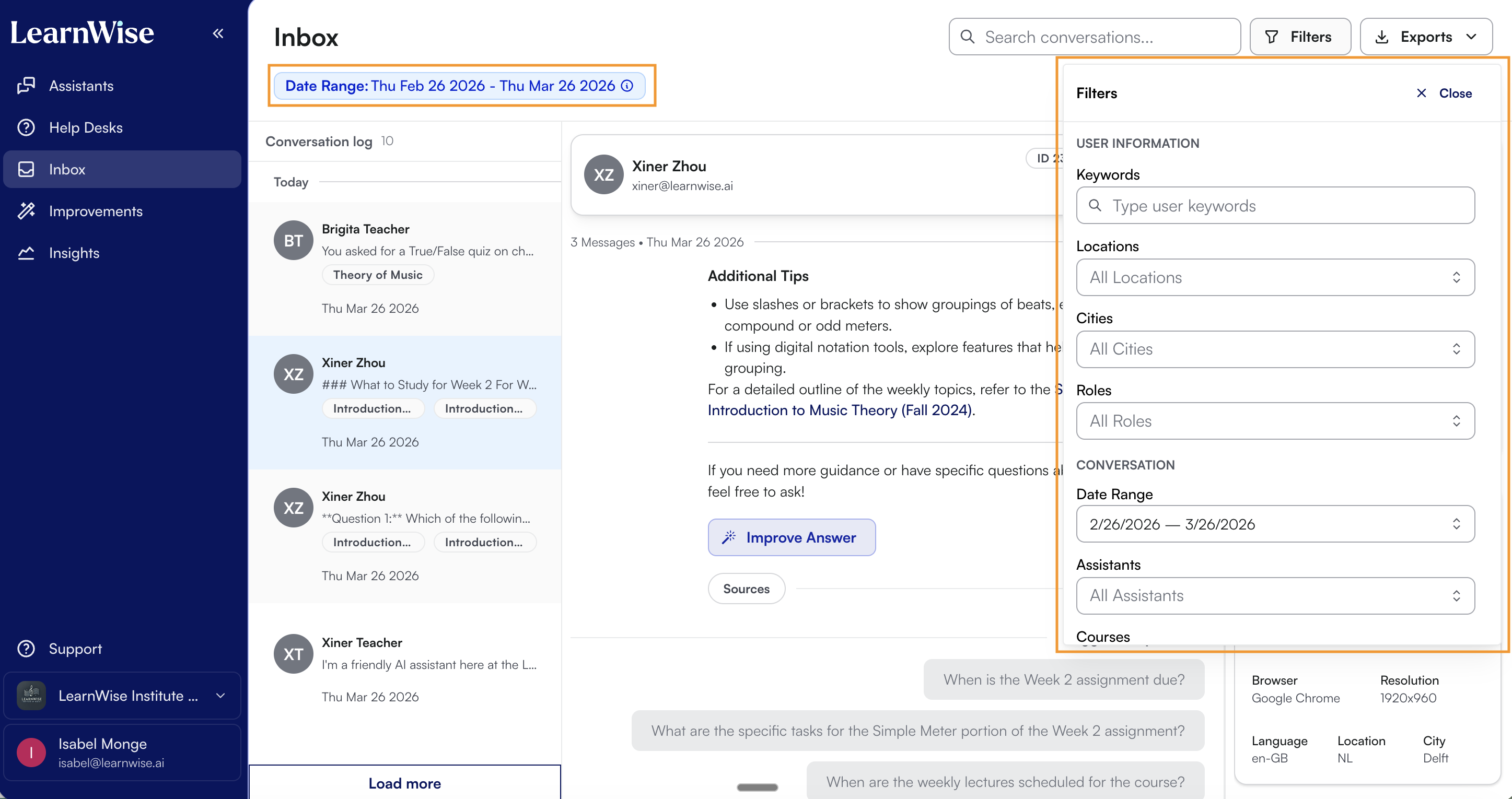
You can filter on conversations based on keywords (minimum 4 letters), user information (name, email), role (if applicable), date range, assistant (if you have more than 1 published), channels, conversation ID, courses (if using a courses assistant), help desks (if activated), feedback and escalations. As you apply each individual filter, it will be presented as a label above the conversation log.
Note: When exporting a report, the filters you have applied will be taken into account. You can also copy the URL to share with others, as this view will include your preset filters.
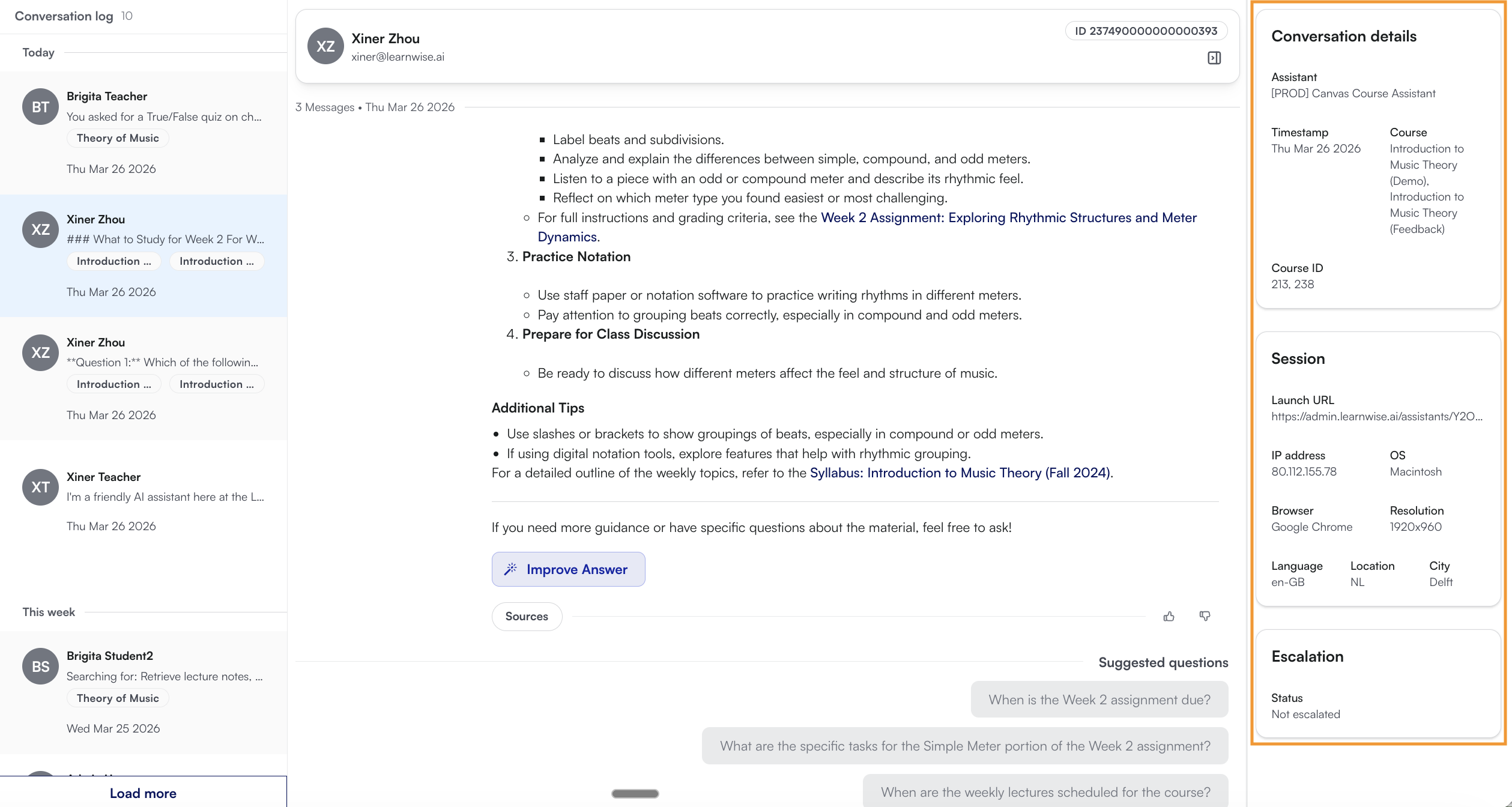
View Conversation Details: By selecting a particular conversation, admins can view the full chat transcript including whether workflows were triggered or a specific mode was entered. The following information will also be displayed per conversation:
- User details (name, email, user ID)
- Survey feedback (1-5 stars) and written feedback (optional)

- Conversation details
- Session information (launch URL, IP address, Browser, Language)
- Escalation (status)
Utilizing the Inbox for Improvement #
Administrators and support personnel can leverage chat logs to:
- Monitor AI Performance: Review conversations to ensure the AI is accurately interpreting and responding to user inquiries. Utilize the Improvements workflow to log changes that need to be made.
- Identify Training Opportunities: Spot patterns where the AI may need further training or additional information to handle certain types of queries more effectively.
- Enhance User Experience: Use the logs to understand common user issues or concerns, leading to improvements in FAQs, support resources, and overall communication strategies.
- Support Staff Training: Provide real-life examples of user interactions to support staff for training purposes, helping them understand common user concerns and appropriate responses.
By actively reviewing and analyzing conversation logs, university staff can continuously refine the AI's performance and ensure the support provided aligns with users' evolving needs.
What Data is Stored in Conversation Logs?
LearnWise conversation logs capture comprehensive information to support analytics, troubleshooting, and compliance requirements. The following data is stored for each conversation:
User Information:
User ID and authentication details (when applicable)
User role (Student, Instructor, Admin, etc.)
User name and email address (where available)
Course/module enrollment information (course assistant)
Conversation Metadata:
Unique conversation ID
Session launch URL and context
Timestamp for each message exchange
IP address and browser information
Operating system and screen resolution
Language preference settings
Session duration and activity patterns
User satisfaction score (1-5) and feedback (optional)
Message Content:
Complete text of user questions and inputs
Full AI assistant responses
System actions (resource recommendations, escalations, etc.)
Citation sources used in responses
Any escalation triggers or help desk routing information
Technical Data:
Assistant ID and configuration used
LMS integration context (course ID, module information)
Error logs and system performance metrics
Feature usage (shortcuts clicked, modes accessed)
Data Retention and Privacy:
Conversation logs are retained according to your institution's data retention policies
Administrators can configure data anonymization settings for some features within the assistant
Personal identifiable information handling complies with GDPR and institutional privacy requirements
Data is never used to train third-party language models
This comprehensive logging enables detailed analytics, supports quality improvements, and provides administrators with full visibility into AI assistant interactions while maintaining appropriate privacy controls.
Still stuck?
Ask the LearnWise assistant. It answers from these guides.
Related guides
- How do I create and export a report of Inbox conversations?Insights & Reports
- What insights are available to instructors?Insights & Reports
- Benchmarking: How much usage should we be expecting and what are the average AI resolution rates?Insights & Reports
- How can I view and understand assistant usage insights?Insights & Reports
- How to create a new trends report?Insights & Reports