

How can I integrate a ticketing system?
A guide to integrating your existing ticketing system with LearnWise help desks so chat escalations can automatically create and manage support tickets.
2 min readUpdated
On this page
Connecting Your Ticketing System / Support Software to LearnWise AI Chat #
Integrating your ticketing software with LearnWise's help desks centralizes your support flow, enabling direct ticket creation from chat escalations. This feature ensures that all user interactions are tracked and managed effectively within your existing support framework.
Step By Step #
-
Login to LearnWise Admin via admin.learnwise.ai
-
Navigate to Help Desks: In LearnWise, go to the "Help Desks" area and select the help desk to connect with your ticketing system. Click "Manage Desk" to proceed.
-
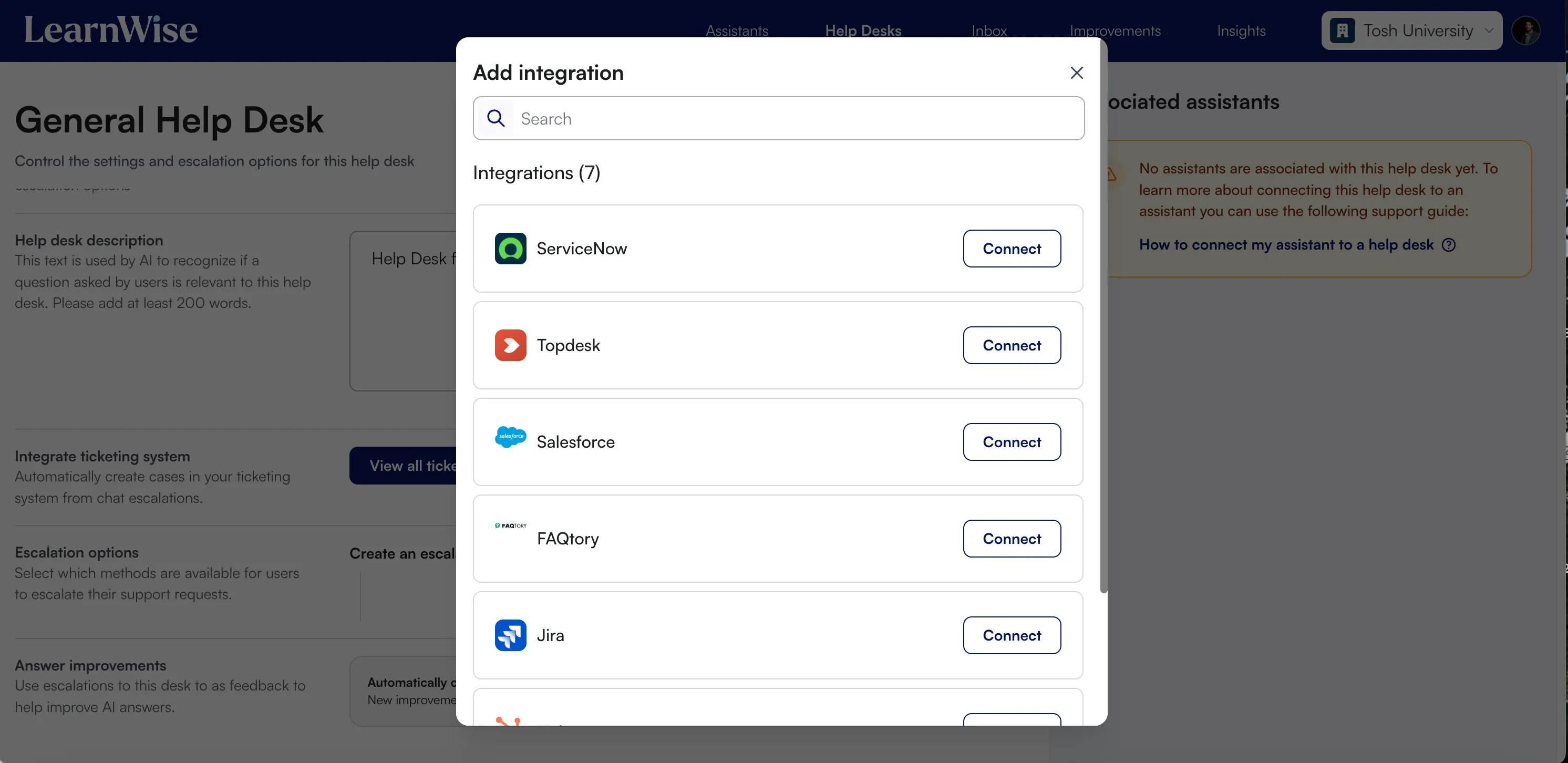
Set Up the Integration: Find the "Integrate ticketing system" area and click "View all ticketing integrations". In the modal, click the ‘Connect’ button next to the desired ticketing system. Note: If you do not see your preferred ticketing provider, you can use the API Endpoint escalation option to integrate with custom systems. Alternatively, contact the LearnWise team at help@learnwise.ai.
-
Enter Ticketing System Details: A new window will ask for an integration name (e.g. ServiceNow Production) your ticketing system's base URL, username, and API key (varies per ticketing system) to establish a secure connection.
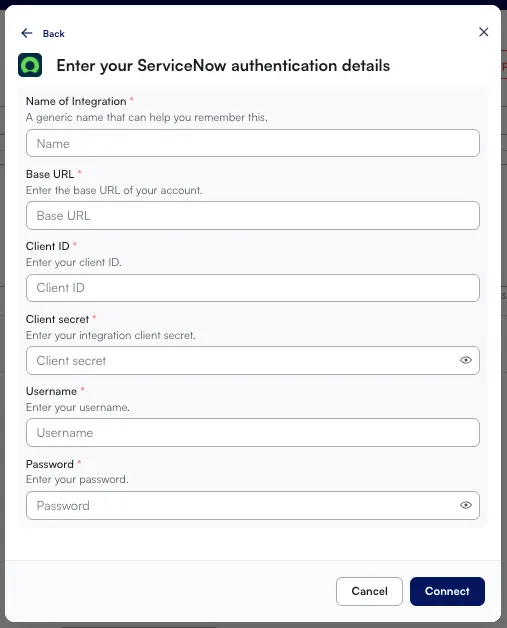
- Follow the relevant instructions for your ticketing provider to generate these credentials or authorize the connection.
- Enter the required credentials and click “Connect”. The integration is now shown in the ‘Integrate ticketing system’ section. Note: existing integrations can be reused in multiple Help Desks.

- Customize Ticket Creation Options for each Escalation Option: Choose the escalation options that will trigger ticket creation within your ticketing system, streamlining the process for specific support channels.

- Map Escalation Form Fields: Once connected, you can map fields from the LearnWise escalation form to your ticketing system, ensuring data consistency.

- Save and Test Your Setup: After configuring the settings, save your changes and conduct a test to confirm that tickets are created as expected.
By integrating your ticketing system, LearnWise enhances the support structure, allowing seamless transitions from AI interactions to human-assisted resolutions.
Flexibility for Multiple Help Desks #
Each help desk in LearnWise can be connected to the same or different ticketing systems, providing maximum flexibility to accommodate various departments or roles within the institution.
Still stuck?
Ask the LearnWise assistant. It answers from these guides.
Related guides
- How do I integrate Salesforce ticketing system?Build your assistant
- How do I integrate ServiceNow ticketing system?Build your assistant
- How do I integrate with HubSpot ticketing system?Build your assistant
- How do I add knowledge content that is hosted on external platforms?Build your assistant
- How do I create a new Help Desk?Build your assistant