

Communication Guide: Launching an AI Assistant At Your Institution
A communication guide for launching the LearnWise AI assistant (Aiden) at your institution, explaining benefits, student FAQs, escalation to human help desks, data privacy, and how the assistant is trained and accessed.
9 min readUpdated
On this page
Introduction #
This communication guide outlines a suggested strategy for introducing LearnWise AI Assistant to your institution's faculty, students, and community.. LearnWise is an AI-powered assistant designed to provide 24/7 support to students, streamline access to resources, and enhance the overall learning experience. This guide provides a comprehensive plan to effectively communicate the launch, benefits, and usage of LearnWise to our students and faculty.
Objectives #
- Introduce LearnWise AI Assistant to students and faculty
- Highlight the benefits and capabilities of the AI assistant
- Provide clear instructions on how to use LearnWise
- Address potential concerns and FAQs
- Establish a framework for gathering feedback and measuring success
Introducing the LearnWise AI Assistant #
LearnWise is a AI-driven assistant designed to make <INSERT INSTITUTION NAME>'s information accessible anytime, anywhere. It operates within our digital academic environment, including our <INSERT LMS NAME> (e.g., Canvas), <INSERT COLLABORATION PLATFORM> (e.g., Microsoft SharePoint), and the <INSERT INSTITUTION NAME> website. The AI assistant, named Aiden, is available to support our students throughout their academic journey at <INSERT INSTITUTION NAME>.
Key Benefits #
-
24/7 Support
LearnWise provides instant answers and support, accommodating diverse schedules and learning preferences.
-
Easy Access
Available across multiple platforms in the digital learning ecosystem.
-
Personalized Assistance
Tailored to <INSERT INSTITUTION NAME>'s specific resources and information.
-
Brings your support cases to the right help desk
Streamlines access to support services and ensures requests go to the right department.
-
Helps human support teams solve cases faster with extra context
LearnWise complements existing support staff by handling routine queries, and sharing key user and support case details with the right support teams for the complex cases.
Student FAQs #
How can an AI assistant help me (student) in my uni life? #
If you're reading this, it's because your university understands that teaching and learning are increasingly digital, evolving from traditional 9-5 operating hours to 24/7 learning hubs. Modern-day students increasingly seek flexible learning environments to accommodate their diverse schedules and learning preferences. This means student support services have to be on their A-game, tasked with ensuring you have access to resources and support at all hours. That's why LearnWise developed an AI-poweredassistant, specifically tailored to your university's resources, to help you out with questions anytime, anywhere.
Your AI-powered university assistant is there to make your life easier as a student: we're there to streamline access to support services, provide instant answers, and ensure your request goes to the right department, making it easier for you to get the answers you need without the hassle of bureaucracy.
LearnWise is a dedicated AI-driven chatbot designed to make your uni's information accessible anytime, anywhere. That means that we're anywhere your digital academic environment operates: your student portal, Learning Management System (Canvas, Brightspace, Blackboard, Moodle and more!), Microsoft Sharepoint, and your university website. This means your AI assistant, Aiden, is at every step of the way with you, whenever you need it.
LearnWise is specifically designed for universities, so we speak your language. Getting you to the right department is easy because we know how to contact them, and where to hand it over to human support staff to chat further about your questions or challenges. When AI is not able to help, we reroute you to get the support you need.
How to use LearnWise as a student? #
LearnWise AI acts as an AI Assistant, so they're with you on any website in your digital learning ecosystem (ex Canvas, Brightspace, Blackboard, Moodle, Microsoft Sharepoint, MyDay, Campus groups and more).
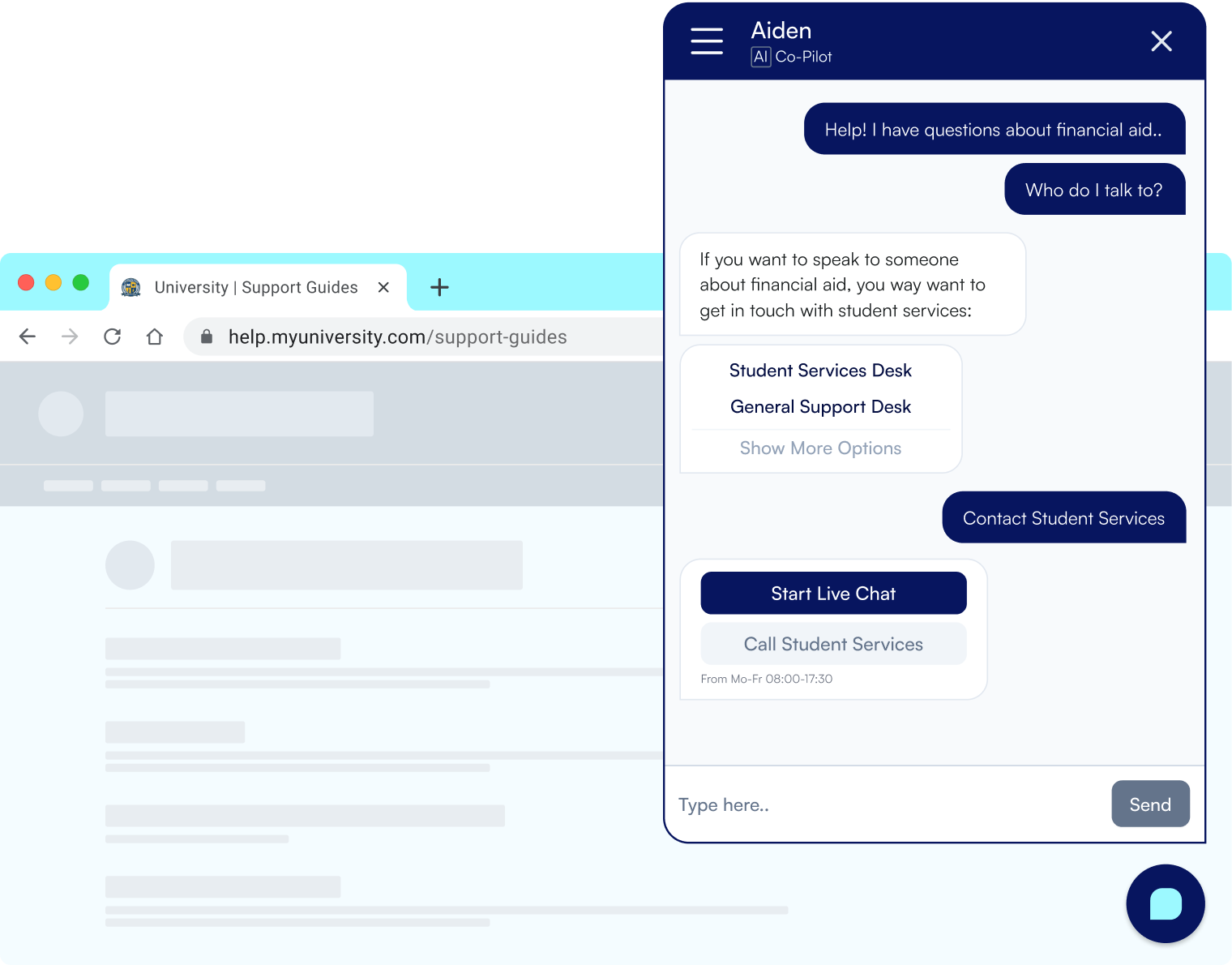
All you need to do is click on the support button in the bottom right corner of your screen, and type in your question. Once Aiden receives it, it'll give you an answer, and if you need further help, it will link you to the right department to give you a (human) hand.
If you have more questions on how to use LearnWise AI, please visit Help Center or email the LearnWise team at help@learnwise.ai
When can I talk to a human? #
You might be asking yourself… Where did all the humans go? No worries, they're still around!
Your institution can set up a variety of different ways for you to escalate your questions to the most relevan thelp desk using the ‘Contact Support’ button directly within the AI Assistant chat experience.
LearnWise AI is a tool that helps university support staff help students at a larger scale, in much less time. Whenever a challenge needs a human hand, this AI Assistant will send you right over to the appropriate department. The idea isn't to replace human staff, but to give them extra time to help students like you with special or more complex cases, so everyone gets the help they need, a little faster and more efficiently.
Universities have a LOT of different tools, digital spaces, and programs in their digital learning landscape. Aiden acts like a helper through it all, giving students the answers they need without having to navigate multiple student portals or websites - saving everyone time.
LearnWise also collects feedback from student conversations to help support staff on what's working and what's not. This feedback loop is essential to ensure that every student gets the most accurate, up-to-date information, whenever it's needed. In this way, AI and human staff work together to give students more support.
What kind of questions can I ask? #
Curious to know what kind of questions you can ask your AI Assistant? Your institution can customize exactly which what knowledge the AI Assistant has, but here are a few topics Aiden is frequently knowledgeable about.
All things EdTech
The chatbot can instantly answer any questions you might have about any of the EdTech tools in your learning ecosystem. That means: how to use Canvas LMS/VLE, how to upload an assignment, where to find a grades on TurnItIn.com, how to reset your password and the like.
Student Services
Got any questions about financial aid or who to contact about housing on campus? Aiden will point you to the right resources or escalate the topic with support staff if needed.
Course Questions
If activated within your LMS course (ask your university staff about this!) Aiden can promptly answer all course-related questions - be it about exams, paper due dates, or anything else. Think: "Where is my exam room located?" to "When is my essay about the digitalization of education due?"
University Specific Answers
Aiden is here to provide instant answers to key FAQs specific to your uni. Whether it’s the enrollment deadline or the dates for summer break, Aiden helps you stay informed.
Send Complex Cases To The Most Relevant Help Desk
Your AI assistant ensures all support cases are directed to the most relevant help desk, leaving your university's support staff to get in touch with you directly, and leaving humans to do the rest.
How can I contact humans? #
If you can't find the answers you're looking for, Aiden will escalate your request to the human-led help desk at your university. The AI assistant has smart routing, which just means they make sure your question goes to the right place - be it the IT department, the university admissions office, or the library.
Look for the ‘contact support’ button within your chat conversation to escalate your request.
Where can I find Aiden? #
You can find Aiden on any platform your university offers - your student portal, the institution's website, intranet, your learning management system (think Canvas, Blackboard, Brightspace) - or even in Sharepoint.
Once I reach a human, how do they know what I'm talking about? #
By the time your question has been sent over to support staff, they can get access to the conversation you've had with Aiden, and request any other relevant information so they can solve your request - such as your student email or ID number.
Who can I contact if Aiden isn't working? #
If you're encountering problems, you can try your IT helpdesk at your university or contact us at help@learnwise.ai to help. We also have our assistant to answer all your question available at Help Center
What happens to my data? #
In a virtual learning environment, Aiden gathers a student's username, email address and/or student number. This information is essential to follow up on requests or to be able to direct students struggling with their mental health to the right place, as soon as possible.
Other than that, any conversation data Aiden has stored in its system is always kept in a closed environment, only accessible to your university administrators. This is so they know what questions you asked if they were answered properly, and if Aiden is doing its job well.
It's important to note that the conversations themselves are never used outside of our institution - LearnWise does not train it on conversational data. Conversations go directly to university administrators so they can understand the amount of requests completed, escalated, and resolved.
Aiden is fully compliant with GDPR.
How does the AI Assistant get trained? #
We use your university's online resources, documentation, and even private resources to train the AI Assistant. We make sure the assistant has the right amount of access to these resources and that these materials are fully owned by the institution before we train it.
To improve Aiden's responses, we always look at the sources cited. Institutions can check if the information is up to date, and if anything is missing or needs adding. Aiden directly pulls from these sources, so the quality of its answers relies on the information your university feeds it.
Is Aiden available in different languages? #
We currently support 107 languages at varying levels - some of them at higher levels than others. Depending on the university's (and your) preferences, we can adjust Aiden to speak your language.
How is LearnWise different from ChatGPT? #
We get it - ChatGPT is great. However, Aiden has been specifically trained to answer the questions you need answers to - and gives you the most up-to-date, verified sources to back it up.
Aiden can give context-specific answers to students' questions because it has been trained and personalized with a university's resource library, so it can reliably, and easily give you complex information in a way that is easily accessible and digestible. For example: it can break down complex topics such as exam policies, or any other specific information about financial aid, so students can access the right information according to their situation within their university, not any other institution.
Still stuck?
Ask the LearnWise assistant. It answers from these guides.