

What are Slots and how do I use them in Flows?
A guide to creating and configuring Slots so your assistant can remember details from a conversation and reuse them across responses, actions, and Flows.
9 min readUpdated
On this page
What Are Slots? #
A Slot is a named, typed value that a Flow, or the assistant automatically, fills in from the conversation. Once a Slot has a value, any Flow can drop it into a response using a reference tag, like {{slots.major}}. Slots are created and edited entirely from the admin panel; no coding required.
Every Slot has four things: a Name (the label shown in lists), a Reference (the short tag used to pull the value into a response), a Type (Text, Choice, Number, or True/False), and What to collect (the instruction the assistant reads to know what it's looking for).
There are two scopes, and where you create a Slot decides which one it is:
| Conversation Slot | Flow Slot ("this Flow") | |
|---|---|---|
| Created in |
Assistant → Flows → Slots tab |
Inside a Flow, via its Slots button |
| Lasts for |
The whole conversation |
One run of that one Flow, then discarded |
| Readable by |
Every Flow on that assistant |
Only the Flow it was created in |
| Filled by |
Automatic extraction, checked after every student message |
Computed fresh, only when that Flow's actions run |
| Extra settings |
Auto-extraction toggle, plus Write once / Overwrite |
None beyond Type and What to collect |
Creating a Conversation Slot #
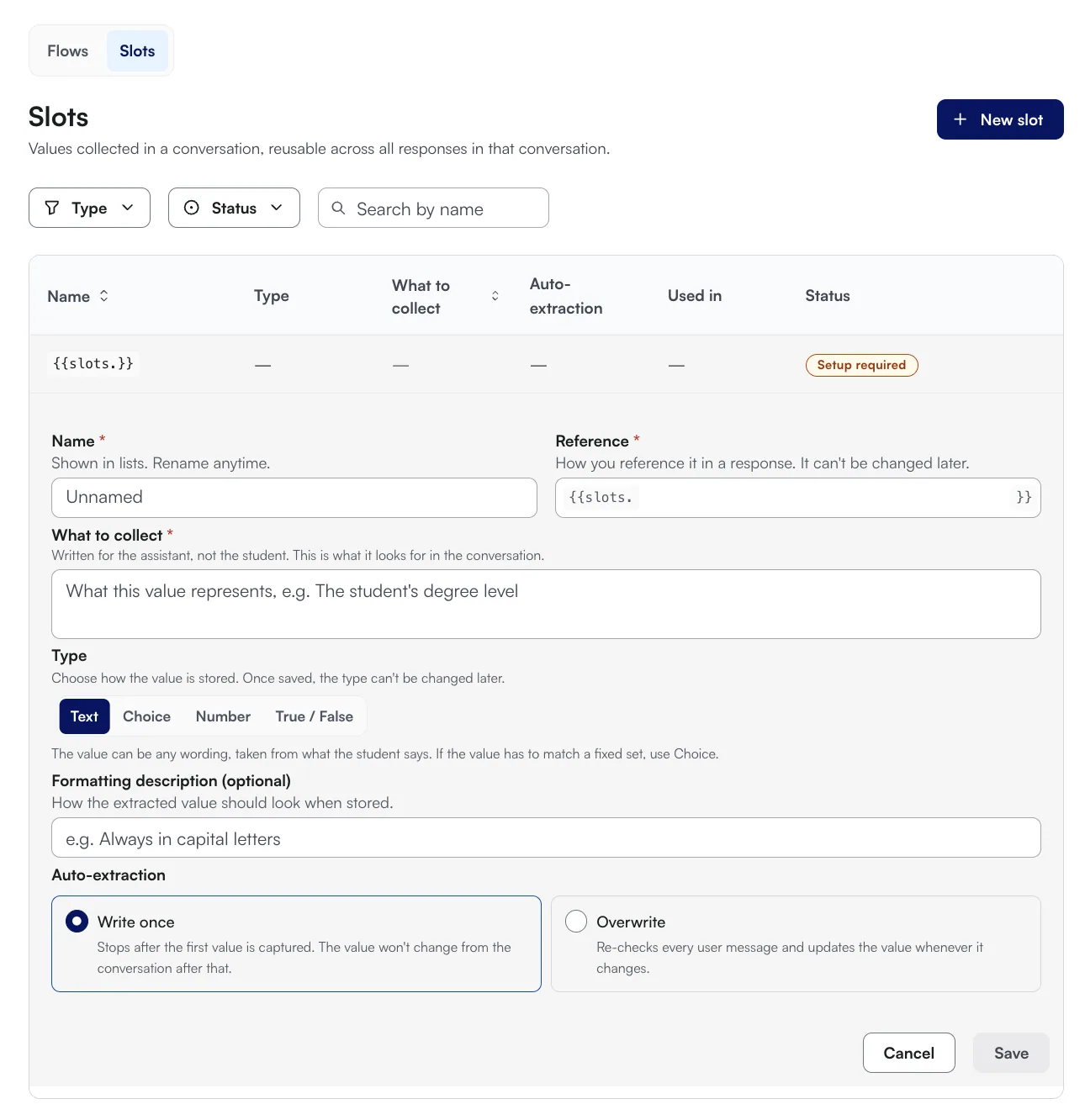
Log in at admin.learnwise.ai and navigate to the assistant you wish to update. Click the Flows tab, then open the Slots tab, and click New slot.
| Field | What it controls | Editable after saving? |
|---|---|---|
| Name | Label shown in the Slots list and in "Used in" references | Yes, anytime |
| Reference | The tag used everywhere the value is pulled in, e.g. degree_level |
No. Locked the moment it's saved |
| Type | Text, Choice, Number, or True / False | No. Locked the moment it's saved |
| What to collect | Written for the assistant, not the student: what it should look for in the conversation | Yes |
| Auto-extraction | Whether this Slot fills in on its own after each message (conversation scope only) | Yes |
| Write once / Overwrite | Only shown once Auto-extraction is on; required together | Yes |
The Reference field only accepts lowercase letters, numbers, and underscores, and must start with a letter. Get it right before saving, since it can't be changed afterward. If it's wrong, the only fix is deleting the Slot and creating a new one.
Creating a Flow Slot #
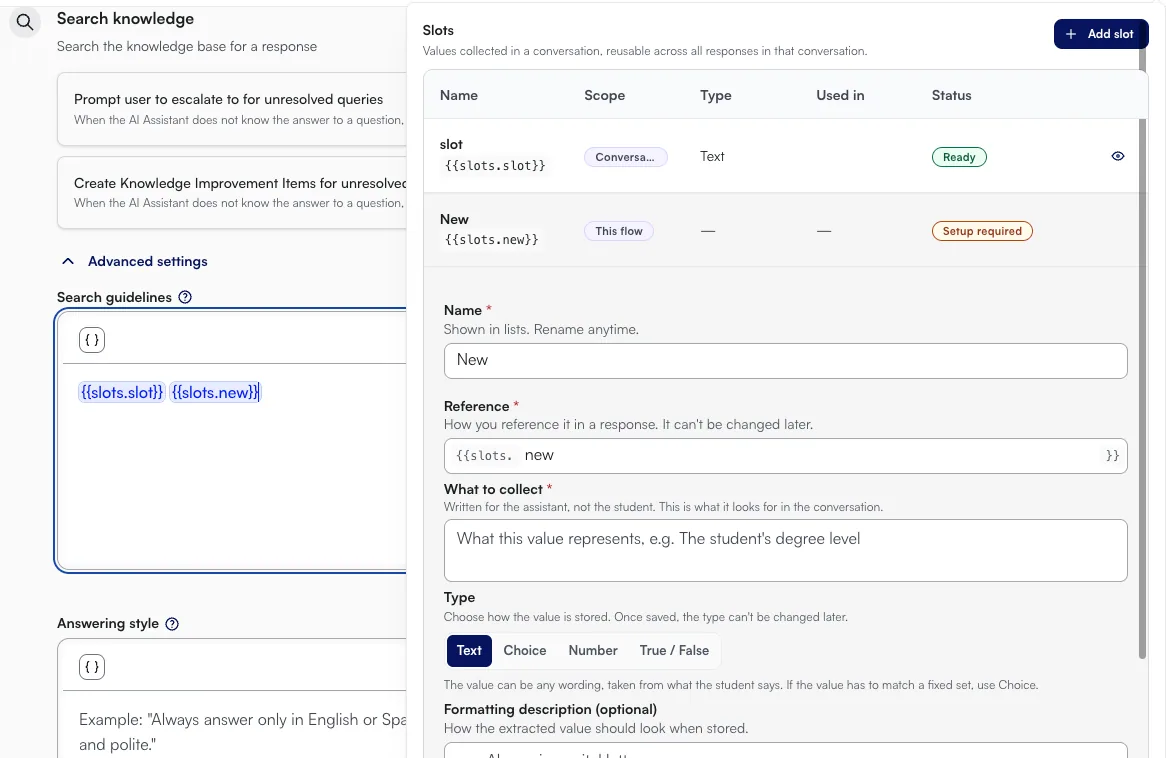
Open the Flow you want to add it to, then click its Slots button (shown as "Slots" or "Slots: 3", with a "needs setup" flag if any Slots are incomplete).
A Flow Slot uses the same Name, Reference, Type, and What-to-collect fields as a Conversation Slot, but has no Auto-extraction or Write once / Overwrite setting, since it's recomputed from scratch every time that Flow's actions run.
Quick creation shortcut: while typing any field that accepts Slot references, start typing {{ to open the variable picker, then {{slots. to search existing Slots or create a new one without leaving the field. A Slot created this way starts out named "Unnamed" and shows as needing setup until its Type and What-to-collect are filled in.
How it looks to search existing Slots: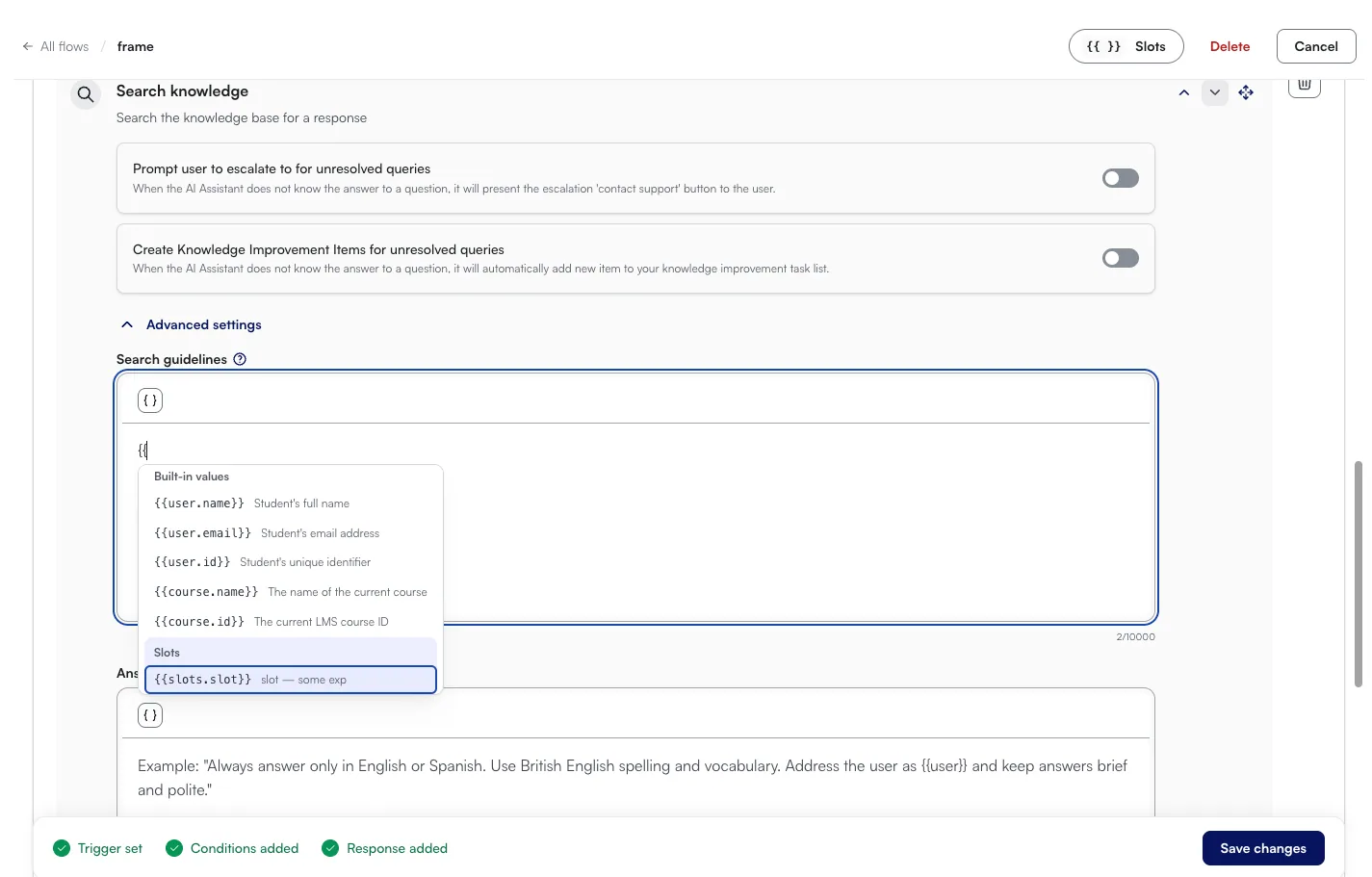
How it looks to create a new Slot without leaving the field: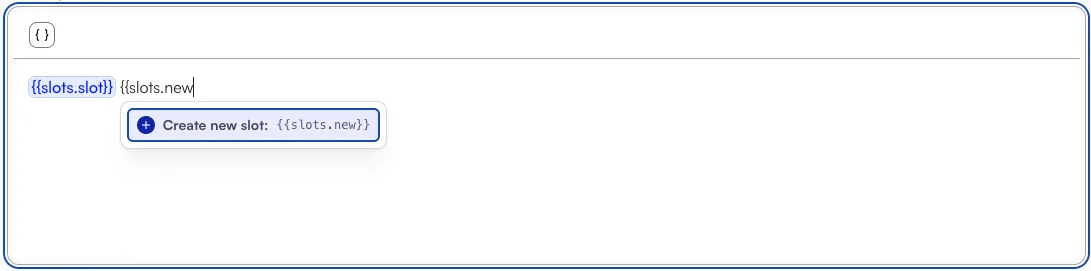
Type-Specific Fields #
| Type | Extra fields | Notes |
|---|---|---|
| Text | Formatting description (optional) | Free-form wording, taken as the student says it, optionally normalised, e.g. "Always Title Case" |
| Choice | Options: each row pairs "what the student means" with "what gets stored" | Add as many meaning-phrases per option as help with matching (typos and slang included); keep the stored side short and consistent, since that's what lands in messages, emails, and API bodies |
| Number | Whole number or Decimal; Decimal adds a Rounding setting | Rounding: No rounding, 0, 1, 2, or 3 decimals |
| True / False | None | A plain yes/no read; no options list needed |
Editing and Deleting Slots #
Editable anytime: Name, What to collect, a Choice Slot's options, a Text Slot's formatting description, a Number Slot's rounding, and (conversation scope) Auto-extraction / Write once / Overwrite.
Locked forever once saved: Reference and Type. Changing either means deleting the Slot and creating a new one; the new Slot has no memory of values the old one held.
A few things worth knowing:
- Narrowing a Choice Slot's options doesn't touch values already stored in conversations carrying one of the removed options. But if a live conversation is holding a now-removed option's value, that value is cleared automatically the next time the conversation continues, so it never silently points at an option that no longer exists.
- Deleting is blocked while any Flow still references the Slot, whether in a response's text or as the target of a Slot-setting action. The Slots tab's "Used in" column lists exactly which Flows, so you know what to edit first.
- Deleting a Flow deletes its own Flow Slots along with it. They never existed anywhere else.
Using a Slot's Value #
Anywhere a field accepts Slot references, typing {{ opens the picker, and {{slots. filters it to your Slots by name or reference.
Fields that accept a Slot reference:
-
Message text
-
Search knowledge (both the search guidelines and the answering style)
-
Follow-ups
-
Button (name, link, or send-text)
-
Iframe (title, and the query string of the link)
-
API request (URL, headers, and body, across all three status messages)
-
Send email (subject and body)
-
Study Mode custom instructions
-
Realtime audio system prompt
-
Handover exit condition.
Two rendering rules worth knowing before you build:
- Text and Choice (Text) Slots render as plain text. Number and Choice (Number) Slots render unquoted. This matters inside an API request body written as JSON:
"urgency": {{slots.urgency}}produces a real number, while"category": "{{slots.issue_type}}"(quotes kept around the tag) produces a string. - In an Iframe, a Slot reference only survives in the query string, after a
?, not inside the path. A link built as.../search?query={{slots.place}}resolves correctly; one built as.../map/{{slots.place}}does not.
A reference to a Slot that doesn't exist (or, for a Flow Slot's own tag, doesn't exist on that Flow) is caught when you try to save, not left to fail silently later.
The "If a Slot Is Missing" Step #
Any Flow that references at least one Slot gets this step at the bottom of its configuration. It decides what happens when the Flow's response needs a value it doesn't have yet.
What triggers it: at run time, if any referenced Slot is still unset, none of the Flow's response actions run. This step runs in their place instead.
Two modes:
- Let the assistant handle it (the default): the assistant asks for whatever's missing, in its own words, based on each Slot's "What to collect" description
- Custom instructions: free text you write yourself, covering what order to ask in, what to assume if the student doesn't know, and when to stop asking and proceed anyway
It's one setting for the whole Flow, not one per Slot, so if a Flow references several Slots, word your custom instructions to cover all of them. Once everything the Flow needs has been captured, the Flow runs its normal response the next time it matches.
Conditions and Slot Values #
A Flow's trigger conditions can take current Slot values into account, and there are two distinct ways to do it, with two distinct meanings.
Direct: {{ }} in the condition |
Indirect: naming it in wording | |
|---|---|---|
| How | Write the tag itself, e.g. {{slots.objective_reached}} is true |
Describe the Slot in plain language, e.g. "the conversation slot objective_reached is true" |
| What it means | Not a text substitution. The assistant reads it as a pointer to that exact Slot, and weighs its current value as part of judging the condition right at that point in the sentence | The assistant is given every currently known Slot value as background context while it judges the condition, and matches your description to the right one itself |
| Best for | Pinning a condition unambiguously to one specific Slot, however the rest of the sentence is worded | Conditions whose real logic is a broader situation (like "the meeting is over") that a Slot is just one signal toward |
Either way, this is how a second Flow can react to something an earlier Flow, or automatic extraction, already set, without the two Flows needing to be connected in any other way.
Only Conversation Slots are meaningfully readable this way across Flows. A Flow Slot only exists while its own Flow is running, so referencing it, directly or by name, in a different Flow's condition has nothing to read.
Rules to Remember #
- Reference and Type lock in the moment a Slot is saved. Everything else (Name, What to collect, options, formatting) stays editable.
- References are unique across the whole assistant, whatever the scope. A Conversation Slot and a Flow Slot can never share one.
- Where you create a Slot decides its scope. There's no field to change that afterward; only delete and recreate elsewhere.
- A Flow Slot only resolves inside its own Flow. A Conversation Slot resolves everywhere on the assistant.
- One unresolved reference blocks the whole response for that run. The "If a Slot is missing" step runs instead of any of the Flow's actions.
- A condition can reference a Slot two ways, and they mean different things. See Conditions and Slot Values above.
- Avoid referencing Slots in Flows that trigger before anything's been said (chat-opens, time-on-page). There's been no conversation yet for anything to have been captured from.
- Number and Choice (Number) values render unquoted. Text and Choice (Text) values render as plain strings. This matters inside a JSON API body.
- A Slot can't be deleted while any Flow still references it. The Slots tab's "Used in" column shows exactly which ones.
Frequently Asked Questions #
I need to change a Slot's Reference or Type after saving it. What's the actual fix? Delete the Slot and create a new one with the corrected Reference or Type. The new Slot has no memory of anything the old one held, so any place still referencing the old tag needs updating to the new one.
Can a Conversation Slot and a Flow Slot on the same assistant share a Reference? No. References are unique across the entire assistant regardless of scope, so once either exists, the other can't be created with the same tag.
What happens to a Flow's own Slots if I delete that Flow? They're deleted along with it. A Flow Slot has no existence outside the Flow it was created in.
Can I search or filter the Slots list? Yes. Search by name, filter by type, and the "Used in" column shows every Flow referencing each Slot before you consider deleting one. Inside a Flow, the Slots button also flags how many of that Flow's Slots still "need setup."
Why would a Slot show "needs setup"? Usually because it was drafted quickly from inside a message field (via the {{slots. shortcut) and still has its default "Unnamed" name with no Type or What-to-collect filled in yet. Finish configuring it from the Slots list.
Still stuck?
Ask the LearnWise assistant. It answers from these guides.
Related guides
- What are triggers and their corresponding responses in Flows?Build your assistant
- Can I be selective around which website content I add to LearnWise?Build your assistant
- How are the multiple different knowledge sources prioritized?Build your assistant
- How can I add AI Student Tutor within Blackboard?Build your assistant
- How can I add an FAQ to my knowledge?Build your assistant